01 Frame Assembly
Arms and Aluminum Fittings
First, take out the drone arms and aluminum parts. The grooves on the aluminum fittings are designed to clamp the arms in place. If you notice gaps or tight insertion during installation, use the included sanding strip to smooth the edges of the carbon fiber arms. Keep sanding until the arms slide in smoothly with zero gaps.
Middle Plate and Aluminum Standoffs Installation
Middle Plate Orientation: Install the middle plate with the grooved side facing upward.
Standoff Distinction: The package contains aluminum standoffs in different lengths. Short 7075 aluminum standoffs go to the front of the frame, while longer standoffs are installed at the rear.
Screw Specification: Use M3*8 screws to fix all aluminum standoffs.
Key Tips to Avoid Rework
M3*10 screws are commonly used for bottom plate installation, but for 30.5mm mounting pattern flight controllers (such as the Fire Phoenix FC), M3*10 screws are either too short or will block the stack mounting holes.
Solution: Replace the four middle stack mounting screws with M3*34 long screws from the accessory pack.
Screw Tightening Technique: Pre-tighten the four outer screws in a diagonal cross pattern. After confirming the plate is perfectly aligned and level, fully tighten all screws.
02 Flight Stack (Flight Controller + ESC) Preparation
Shock-Absorbing Rubber Post Installation Tips
Install the purple shock-absorbing rubber posts on both the flight controller (FC) and ESC. The rubber posts are elastic by design. It is recommended to flatten the posts first, or use tweezers for assistance, twisting and pushing them into the mounting holes until fully seated.
Flight Stack Connection
Use the ribbon cable included in the accessory pack to connect the flight controller and ESC.
Most flight controllers come with two ESC ports that support X8 frame configurations. For quadcopter builds, only connect the cable to the ESC Port 1.
Critical Short-Circuit Prevention Warning
Carbon fiber plates are electrically conductive. When mounting the flight stack to the frame, no extra treatment is required if there is sufficient bottom clearance. However, if electronic components are positioned extremely close to the carbon fiber plate (especially during subsequent VTX installation), you must use insulating nylon nuts or gaskets for isolation. Failure to do so will result in immediate drone burnout once power is applied.
03 Motor Installation
Pre-Installation Preparation
Before formal installation, slide TPU landing pads onto the ends of each drone arm to protect the motors and carbon fiber arm plates from wear and impact damage.
Screw Selection Standards
Side with TPU pad: Use the longer M3*10 screws included with the frame kit.
Side without TPU pad: Use the shorter screws that come stock with the motors.
Critical Safety Check
Always verify that the screw tips do not touch or press against the motor copper coils after tightening. If the screws contact the coils, the motor will burn out instantly once power is supplied.
Wiring Routing Tips
Internal wire routing is highly recommended. Route each motor wire along the inner side of the drone arm before extending them to the ESC solder pads. Secure the wires to the arms with kapton tape in advance. This prevents wire displacement during trimming and soldering, ensuring a neat, clean, and tidy wiring layout.
04 Detailed Soldering Guide
Power Cable & Capacitor Soldering (430℃ High-Temperature Soldering)
Capacitor Polarity Identification
Method 1: The side with a white stripe on the capacitor shell is the negative pole.
Method 2: Lead length differentiation — the longer pin is positive (+), and the shorter pin is negative (-).
It is recommended to cover the capacitor leads with heat-shrink tubing to prevent short circuits.
XT60 Power Connector
Pre-tin both the connector terminals and power wires before soldering. Install the gray protective sleeve immediately after completing the solder joint. Note: Soldering fumes are toxic; always work in a well-ventilated area.
Motor Wire Soldering
Trim the motor wires according to your internal routing layout. Reserve only 2-3mm of bare wire for soldering, and ensure the stripped length does not exceed the size of the ESC solder pads.
Flight Controller Peripheral Soldering (~350℃ Low-Temperature Soldering)
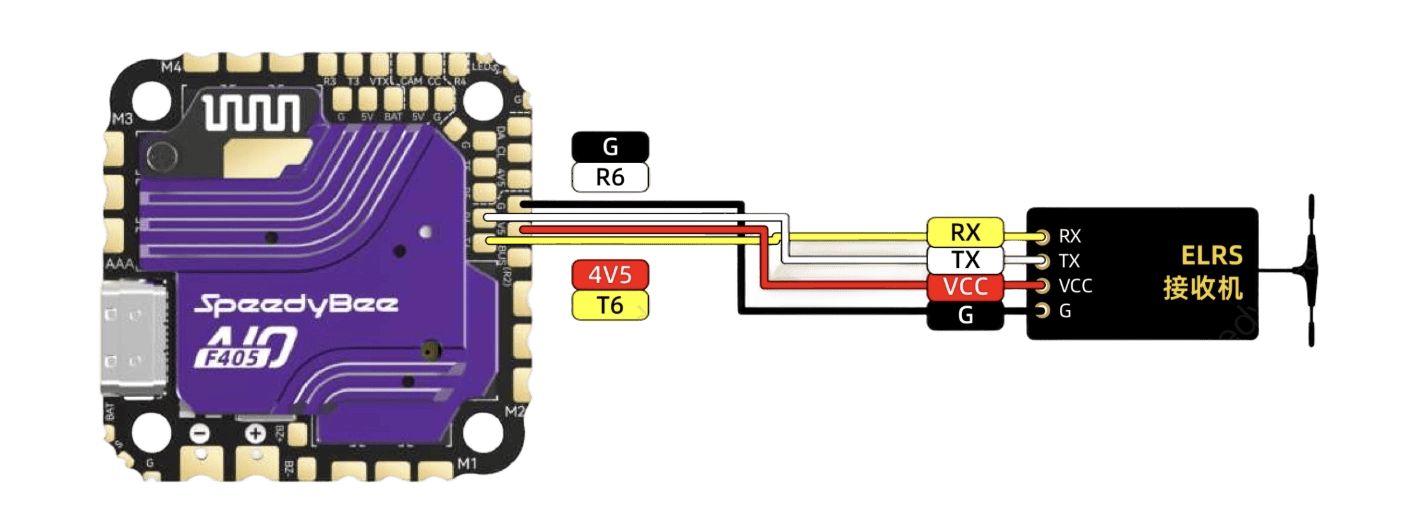
1. Receiver (ELRS Nano Diversity)
Peripheral soldering adopts a lower temperature of approximately 350℃ to avoid scalding delicate peripheral components and damaging flight controller pads. Solder the ELRS Nano Diversity receiver to the corresponding flight controller signal pads with steady and precise soldering operations.
Keep the solder joints small, full, and non-bridging. Avoid excessive soldering time to prevent pad peeling or component burnout. After soldering, check for short circuits, cold solder joints and virtual soldering. It is recommended to fix the receiver with double-sided foam tape or heat-shrink tubing after wiring to prevent shaking and wire loosening during flight.
2. VTX (Rush Tank)
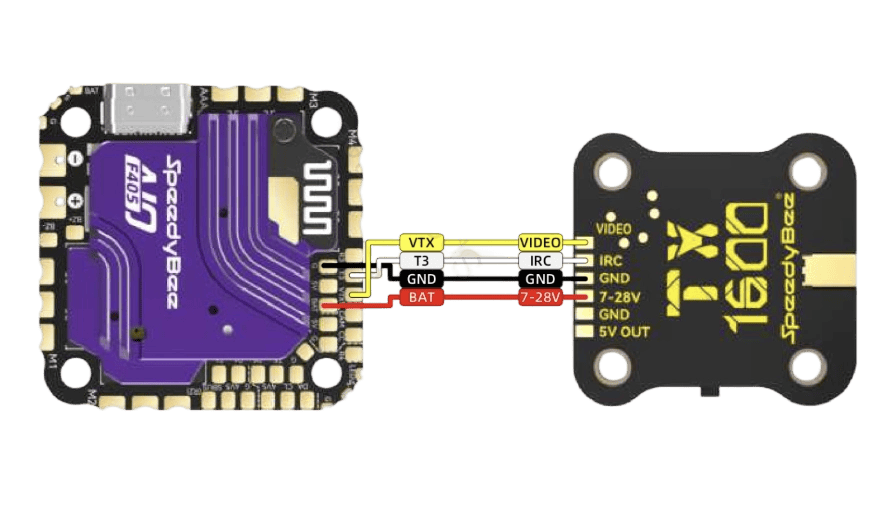
Solder the Rush Tank VTX following the same low-temperature soldering standard at around 350℃. This low-temperature setting effectively protects the delicate VTX circuit board and flight controller pads from high-temperature damage.
Align and solder the VTX power and signal wires to the corresponding FC pads accurately. Ensure each solder joint is full, smooth, and free of bridging, cold solder joints and excess solder. Do not hold the soldering iron on the pads for too long to avoid pad lifting or component damage.
After soldering, double-check all connections for short circuits. Secure the VTX module firmly to the frame with insulating fasteners or tape. Make sure it keeps a safe distance from conductive carbon fiber plates to prevent short-circuit failures during flight.
Flat Cable Processing & Wiring Definition
The stock factory flat cable comes with 6 wires, while only 4 wires are required for normal VTX operation. Use fine tweezers to lift the plug buckle gently, then remove the extra wires (such as audio wires) without damage. This modified wiring delivers a cleaner build and effectively avoids potential short-circuit risks.
Wiring Mapping
7-36V (Red Wire): Connect to the FC 9V or Vbat pad
GND (Black Wire): Connect to the FC GND pad
Video (Yellow Wire): Connect to the FC VO/VTX pad
SmartAudio (Green Wire): Connect to the FC TX pad (such as T1)
3. FPV Camera
Complete camera soldering following the same 350℃ low-temperature peripheral soldering standard to protect sensitive camera circuitry and flight controller pads.
Camera Wiring Mapping
Red Wire (5V): Connect to the FC 5V pad
Black Wire (GND): Connect to the FC GND pad
Yellow Wire (Video): Connect to the FC CAM/C1 pad
Professional Wire Routing Aesthetics & Reinforcement Tip
Twist all internal wires including ESC wires, VTX wires, and camera wires in a tight spiral (twisted-braid style). This professional wiring method tidies up the internal frame layout and greatly improves wire tensile strength. It effectively prevents wire breakage and loose connections during crashes or hard landings, enhancing the drone’s overall durability.
05 Final Assembly
VTX Mounting
The solder pads on the back of the VTX module are flat and conductive. You must use nylon nuts to raise and isolate the VTX, creating a safe gap between the module and carbon fiber frame. This step is mandatory to avoid short circuits.
Front Aluminum Parts Installation
Install the front aluminum accessories according to the engraved markings: R for right and L for left. Secure all parts with M3*6 screws.
Camera Mounting
Fix the FPV camera in place using the included blue TPU printed mount or silicone cushion mount for stable and shock-absorbing installation.
Top Plate Installation
Install lock nuts on all flight stack and VTX fixing screws. Attach the top frame plate lastly and fasten it securely with M3*8 countersunk screws.
Action Camera Mount (GoPro Mount)
If you install an action camera mount, use only round-head flange screws for installation to ensure stable mounting and avoid structural damage.